Maps and rooms / GUIDE 16
Bedroom Bed and Wardrobe Guide
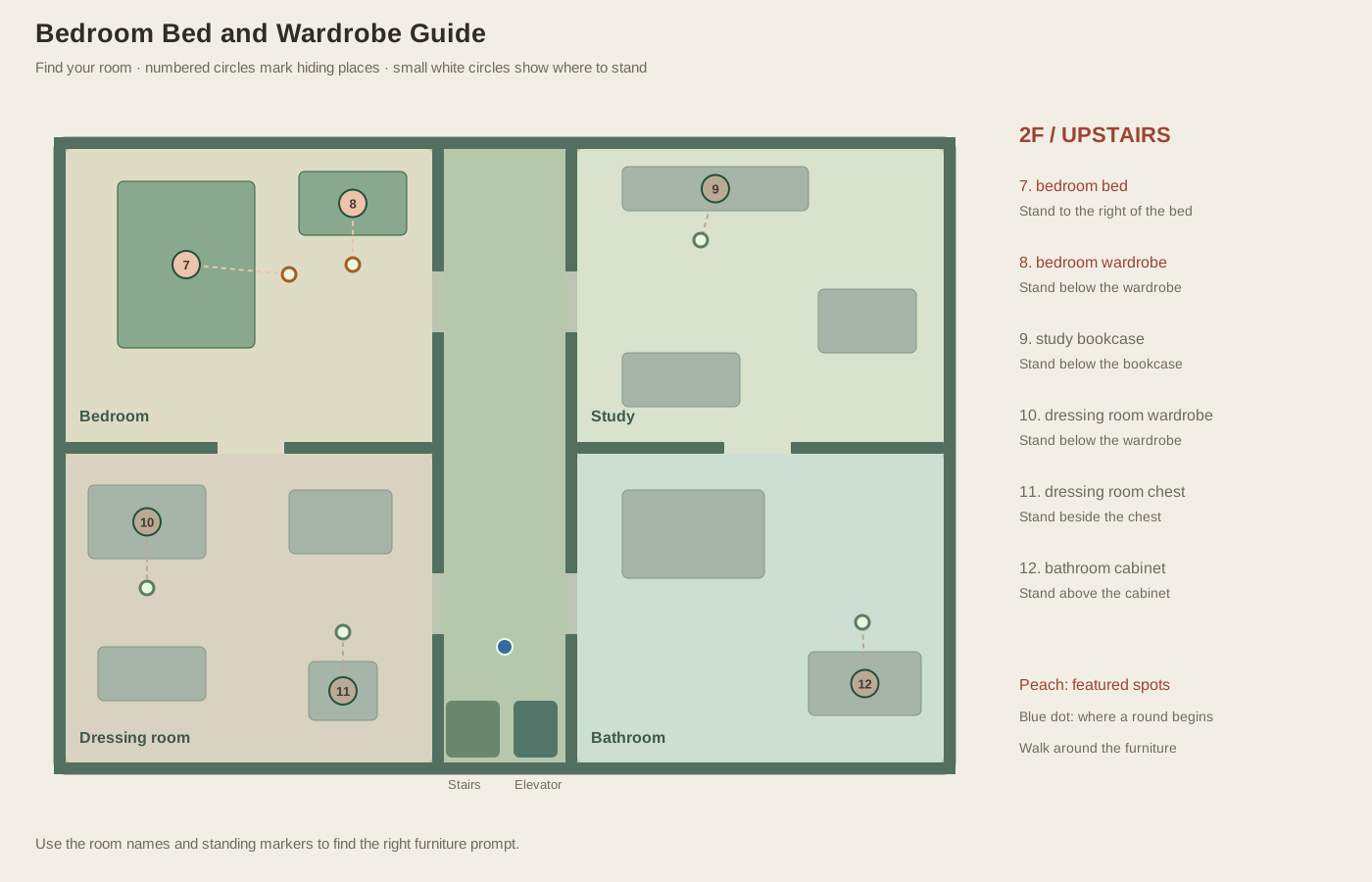
You have reached the upstairs bedroom, but pressing F beside the bed does not seem to check the place you intended. Move toward its right side, then read the prompt before trying again. The bed and wardrobe sit near each other, and both need attention in a complete search. This guide helps you check them separately and understand where you will step out if you choose either as a hiding place.
Reach the correct floor and entrance
Use the stairs or elevator to reach 2F, then move north in the central corridor. Enter the bedroom through the upper opening in the corridor's left wall. You can also arrive from the dressing room below through the opening in the horizontal dividing wall. Confirm the floor indicator before applying this guide: the downstairs upper-left room is the living room and has different furniture and target positions.
The bed occupies a large rectangle toward the upper-left corner. The wardrobe is farther right along the upper wall. Their arrangement leaves navigable open floor around them, but a straight line toward the bed's center will be blocked. Use the illustrated approach markers to choose a walkable destination. Those markers identify where interaction is intended, not a point you must overlap perfectly.
Check the bed from its right side
The bed is easiest to interact with from its right-hand side. Walk into that clear space and read the prompt before pressing F. This is more reliable than trying to approach through the broad front of the bed. In a seeker round, the result appears immediately: either you find somebody or the bed is marked checked. If the round continues, remember that the nearby wardrobe still needs its own separate action.
In a hiding round, F settles your character into the bed and the faded picture confirms your position. You cannot walk out with movement keys while Hidden remains on screen. Press F again when you want to leave, then move into the open floor on the bed’s right side. Knowing that exit helps you decide whether to head toward the wardrobe, corridor, or dressing room before you expose yourself.
Confirm the wardrobe separately
The wardrobe is close to the right side of the bed, so move toward it until the prompt names the wardrobe. If the bed name is still showing, you have not yet changed targets. This is easy to miss when several hiders remain and you are trying to move quickly. A short pause to read the new name is better than leaving the room after accidentally checking the bed twice.
Both spots can hold different AI hiders in a single seeker round. Finding someone under the bed does not clear the wardrobe by implication. Check both before leaving the bedroom unless the final discovery has already ended the round. This discipline becomes more important in a five-hider match, where stopping after one visible success can leave the last opponent in a room you mistakenly considered finished.
Plan a route through the room
A practical upstairs circuit reaches the bedroom after the dressing room, checks the bed and wardrobe, then exits to the central corridor toward the study. You can reverse the order if you enter from the corridor. Neither route has a guaranteed timing advantage in every run because the relevant question is where you arrive, which spots remain, and whether the round has already ended.
As a hider, compare the exit positions rather than treating the wardrobe as inherently safer than the bed. Both belong to every seeker's search pool. Leaving either spot creates an unhidden interval, and being near an AI during a completed check can cause discovery. Practice moving between the two places during the twenty-second preparation phase first. Once you can reliably enter the intended one, use visible seeker activity and the remaining clock to decide whether an active-search relocation has a specific purpose.